Thanks for purchasing the ANZHorseBot.
Select the right betfair in the domain and put your credentials and you will able to login into the ANZHorseBot.
On the left-hand side, you can see all the markets related to Horse Racing for Australia and New Zealand which are available for next 12 hours have been loaded upfront.
Wallet – it will show the current balance in your betfair account.
As you can see, you can run up to five different Backing strategies and 1 laying strategy. You can select countries you want to bet for each strategy.
Market to bet: You can select the market which you want to bet on- Place market or Win market.
Selection: - You can select the favorite you want to bet on among the first eight favorites or any selection. Any selection will qualify any favorite depending on price and stats settings.
Single bet: - if you tick the single bet, it will only place the bet on the best (lowest) price selection out of All qualified selections from that race for that strategy. If it is not ticked, the bot will place bets on all qualified selections for that race. (Not just best/lowest priced).
1.Min price and Max price is the price range which user can select for the horse to be qualified for betting. 2. Time To Bet: Select Pre-Play and 10 seconds in Time to bet settings. So, all races to be checked for qualification starting 10 seconds before the official start of the race. 3.Runners: Select the number of runners you will consider. 4.Minimum amount matched: Amount of minimum money should be matched in the horse race for bot to make a qualified selection. In order to avoid low liquidity matches, atleast keep $10000 AUD or more similar to your betfair account currency. Allow Harness: Tick this if you want to use Harness racing. 5. Inplay Action : Select either SP or keep as the option – it will ensure your bet gets matched before the race starts ( for SP) and during in play ( as Keep).
Fav Strength : Fav has been categorized into 3 categories : Strong , Medium or Fair . Strong is very strong favorite when the 2nd fav is more than 3.0 odds away from the favorite ( i.e. Fav is 2.5 , 2nd Fav is 5.7 – comes under strong category).
Fair is low strength fav , when the first favourite is min 1.0 and max 2.0 odds away from the 2nd favourite . ( i.e. Fav is 2.5 , 2nd Fav is 3.7 – comes under fair category.
ANZHorseBot has inbuilt Australia and New Zealand stats which comes daily around 9:00am (AET) into the bot for day’s racing. It is actually the API feed coming directly from our original ANZHorseRatings software
This screen is only for information purpose for you to look at, as all parameters have been auto connected with the bot.
Win Prize Rating Add February, 2023 Betfair Prediction Ranking Betfair Prediction Price.
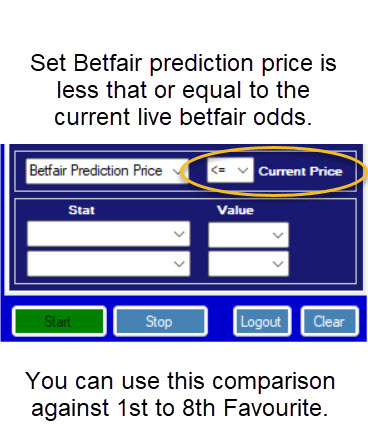
Add November 2023 Betfair Predict Price comparison to Current betfair live odds.
So you can set for example, 1st Favourite price on Betfair must be higher that the Betfair Predicted price which represents that according to the ratings, this is a good value bet as it's past performance rates the horse as better that the exchange is offering.
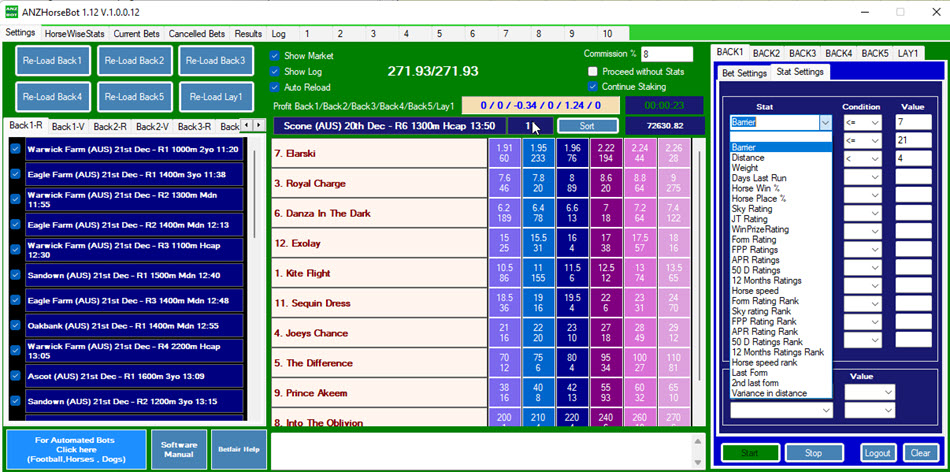
You can select any one or multiple parameters from dropdown and put any threshold around them. For example :- one of the stats settings is as per below :-
Here what we are saying is – want to look at horses which has Sky Rating rank as 1 and FPP Rating Rank also should be 1.
You can put as simple as Win % and Place % also as stats settings as shown above.
How to use the Condition Functions.
If you are familar with excel functions then you will know how to use these symbols. 1. > : Greater Than, so if your condition is you want the Days last run to be greater than 7 days you would have > and in the Value column 7, so the horse must be 8 days or more from last start. 2. < : Less Than, so if your condition is you want the Days last run to be less than 7 days you would have < and in the Value column 7, so the horse must be 6 days or less from last start. 3. >= : Greater than or equal to, so if your condition is you want the Days last run to be greater than or equal to 7 days you would have >= and in the Value column 7, so the horse must be 7 days or more from last start. 4. <= : Less than or equal to, so if your condition is you want the Days last run to be less than or equal to 7 days you would have <= and in the Value column 7, so the horse must be 7 days or less from last start. 5. = : Equal to, this is exact, so if your condition is you want the Days last run to equal to 7 days you would have = and in the Value column 7, so the horse must be 7 days not more or less exactly 7 days since it last start. 6. Blank : When removing a Stat you need to make sure the condition is blank. Let’s discuss staking now…
Level staking: Place level stake on each qualified selection as low as 10p.
Bank – Starting bank. Ratchet Bet % - Say 2.5% of the bank.
After the next round the bank closes with 3,520. Still, the stakes remain unchanged, flat 100.00, using the previous bank of 4,000 for its calculations. Only if the bank closes with under 3,000 (75% of 4,000) will the stake sizes be recalculated.
Above settings are very important to understand. I have not spoken about tabs yets, which I will cover later.
In ANZHorseBot, you will also have one of the finest features which will increase the profitability of the bot exponentially. Here you can run (up to 10 cycles) for Stop At A Winner betting. It has 10 tabs as you can see on the screenshot above.
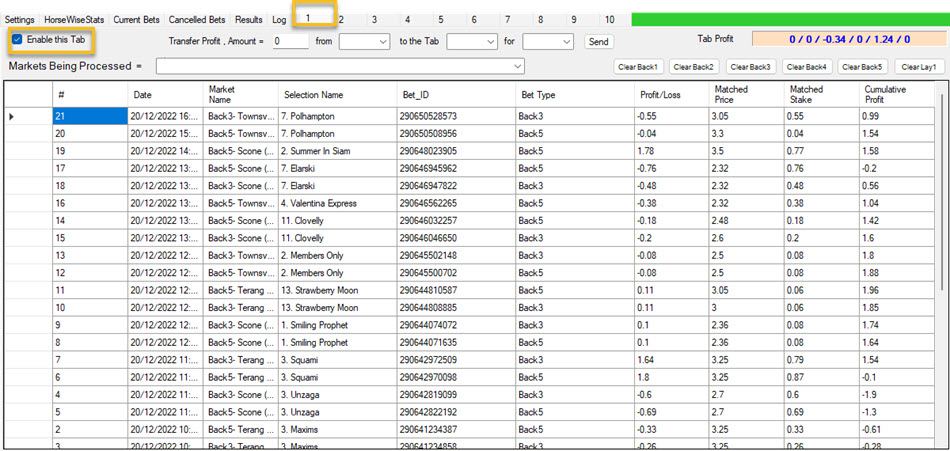
Above is the view of one of the tabs, I will discuss details in tab view later.
Stop @Loss for each tab – is the value once passed then the tab will either stop betting or restart the sequence of betting or continue with the same sequence.
Continue button will ensure that the bot should not stop once profit target is reached (per horse or per tab) but it will start the fresh cycle. So, if you want to keep running the bot always, please keep the continue button ticked.
Here you can see three buttons – Continue with restart and continue without restart and Once the stop loss has been hit for any tab, then you would have option to continue betting as it is or start a new cycle.
If you have all 6 tabs set on opening the bot this sign will appear 6 times, one for every Back Tab and Lay Tab. This is a Betfair requirement, that you acknowledge the risk of the staking plans.
Profit Delta – This is another great feature in the bot. Profit delta is the amount by which next Back stake will be increased once you have the losing bet. For example, if your stop@profit per race is $1 and you have profit delta as $.5, then if you have first race as a losing bet, then your 2nd target will not be $1 but it will be $1.5.
Mexican wave : - This is very important that it is ticked. This instruction makes sure that the betting is alocated to each enabled tab, and then starts again. If unticked it will bet first available tab and not rotate with all available tabs, and it is not the best option.
Start button: - Once the settings are set by the user, press the start button in order to start the bot.
Log out: - press the log out button and you will come out of the bot.
If you want to continue the same cycle, don’t use the clear button and just press the start button and let it run every day. There are respective clear buttons for each tab as well.
There is one box which you will see at the middle center of the interface.
It will show at what time the user pressed the clear button for the particular tab. The profit/loss for tabs will be shown accordingly from the time the clear button was last clicked.
When you click on software manual, you would have got access to this manual only.
C:\Program Files (x86)\Profit Sports Betting\ANZHorseBot\log_files
In results tab, you can see all consolidated results for each tab. Cumulative profit is shown at the top.
Very important to keep the tabs enabled, otherwise bot will not take any bet in that tab, if it is not enabled. Log tab: - it will give you view of what the bot is doing second by second.
Tutorial One.
Runtime 15 minutes. Tutorial Two.
Runtime 26 minutes. Stats setting is 15mins 43 second into the video. These are the latest 2023 Strategies that are performing.These settings are staking $1.00 level and are the enhanced setting (Less Bets.)
You only need to change the horse win % in stats to 10 or 20 if you want more bets.
Results of the Above Strategies since Sept 2022 to Feb 2024
These are the same strategies as we have them in the ANZ analsyer excel that is associated with the ANZ Horseratings Cloud software. A separate product but it is how we research new ways to use strategies. The results are on level staking but we believe with the high strike rate SAAW (Stop at a winner staking.)
|